
Google ADK(Agent Development Kit)のトレースに Langfuse のプロンプト情報を紐付ける方法を解説します。これにより、プロンプトごとのコスト・レイテンシ分析や A/B テストが可能になります。
なぜ紐付けが必要なのか#
紐付けができないと何が困るか#
・プロンプトごとのコスト・レイテンシを分析できない
・A/B テストでプロンプトバージョンを比較できない
・どのプロンプトが本番で使われているか追跡できない
GoogleADKInstrumentor だけでは不十分#
- GoogleADKInstrumentor を使えば、Google ADK のトレースを Langfuse に送信できます。
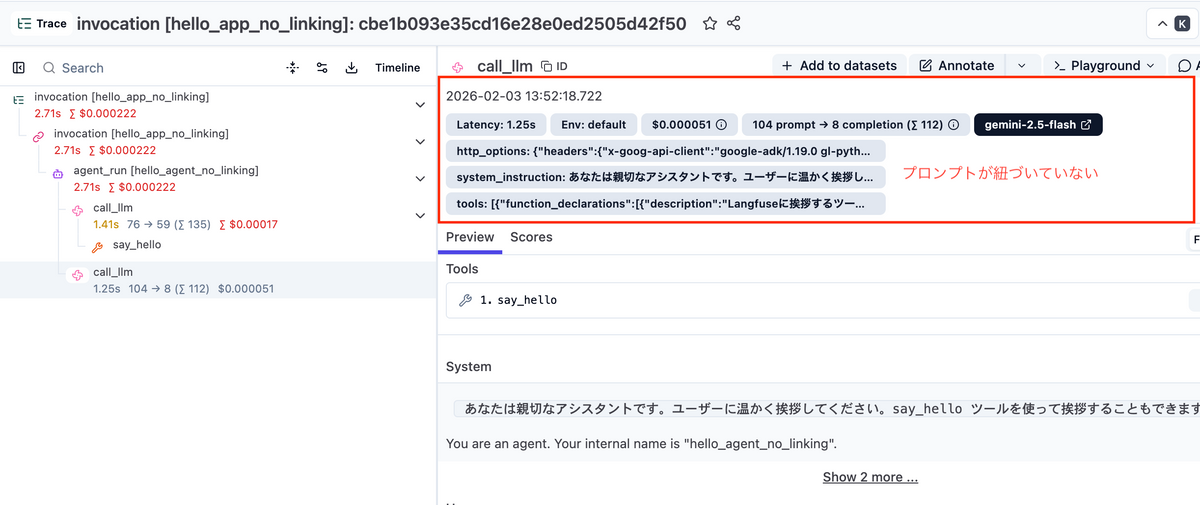
from openinference.instrumentation.google_adk import GoogleADKInstrumentorGoogleADKInstrumentor().instrument()しかし、これだけではプロンプト紐付けがされません。
Langfuse ダッシュボード
    └── call_llm (GENERATION)
        └── promptName: null  ← 紐づいていない
他のフレームワークとの違い#
Langchain や OpenAI SDK では、Langfuse が公式にラッパーやコールバックを提供しており、簡単にプロンプト紐付けができます。
| フレームワーク | プロンプト紐付け方法 |
|---|---|
| LangChain | Langfuse公式Callbackがある |
| OpenAI SDK | Langfuse公式ラッパーがある(langfuse_prompt引数) |
| Google ADK | OTel/OpenInference経由 → prompt属性の概念がない |
しかし、Google ADK は OpenTelemetry + OpenInference 経由でトレースを送信するため、Langfuse の標準的な方法では紐付けができません。この問題はGitHub Issue #7937 で議論されており、本記事ではその回避策を解説します。
仕組み#
■ 解決のポイント#
Langfuse がプロンプトを認識するには、LLM 呼び出しのスパンに以下の属性を設定する必要があります。
・langfuse.prompt.name - プロンプト名
・langfuse.prompt.version - プロンプトバージョン
本記事では SpanProcessor と ContextVar を組み合わせて、call_llm スパンにこれらの属性を自動付与します。
■ 全体の流れ#
instruction 関数内でプロンプトを取得
└─ ContextVar にプロンプト情報を保存
call_llm スパンが開始される
└─ SpanProcessor.on_start() が呼ばれる
└─ ContextVar からプロンプト情報を取得
└─ スパンに属性を設定
Langfuse がプロンプトリンクを認識
└─ ダッシュボードで分析可能に
■ なぜ SpanProcessor を使うのか#
Google ADK は LLM 呼び出しを別スレッド(並行処理)で実行します。通常の OTel Context 伝播では、プロンプト情報を LLM 呼び出しに渡せません。
SpanProcessor を使うと、スパン作成時に直接属性を設定できるため、この問題を回避できます。ContextVar はスレッドをまたいで値を保持できるので、組み合わせて使います。
手順#
■ 必要なパッケージ
pip install langfuse google-adk openinference-instrumentation-google-adk opentelemetry-sdk python-dotenv■ 完全なコード例
以下のコードをコピペで動作します。
import asyncio
from contextvars import ContextVar
from dotenv import load_dotenv
from google.adk.agents import Agent
from google.adk.runners import Runner
from google.adk.sessions import InMemorySessionService
from google.genai import types
from langfuse import get_client
from openinference.instrumentation.google_adk import GoogleADKInstrumentor
from opentelemetry import trace
from opentelemetry.sdk.trace import TracerProvider, SpanProcessor

# ============================================================
# Langfuse プロンプト紐付け用コード
# ============================================================

prompt_info_var = ContextVar("prompt_info", default=None)

class LangfusePromptProcessor(SpanProcessor):
    """call_llm スパンにプロンプト情報を付与する"""

    def on_start(self, span, parent_context=None):
        if hasattr(span, "name") and span.name == "call_llm":
            prompt_info = prompt_info_var.get()
            if prompt_info:
                span.set_attribute("langfuse.prompt.name", prompt_info["name"])
                span.set_attribute("langfuse.prompt.version", prompt_info["version"])

    def on_end(self, span):
        pass

    def shutdown(self):
        pass

    def force_flush(self, timeout_millis=30000):
        return True

# ============================================================
# アプリケーションコード
# ============================================================

async def main():
    load_dotenv()
    langfuse = get_client()

    # 1. TracerProvider を作成し、SpanProcessor を登録
    provider = TracerProvider()
    provider.add_span_processor(LangfusePromptProcessor())
    trace.set_tracer_provider(provider)

    # 2. Google ADK のトレースを有効化
    GoogleADKInstrumentor().instrument()

    # 3. instruction 関数を定義(ここでプロンプトを紐付け)
    def get_instruction(ctx):
        prompt = langfuse.get_prompt("my_agent_instruction")
        prompt_info_var.set({"name": prompt.name, "version": prompt.version})
        return prompt.compile()

    # 4. Agent を作成
    agent = Agent(
        name="my_agent",
        model="gemini-2.5-flash",
        instruction=get_instruction,  # 関数を渡す
        tools=[],
    )

    # 5. セッションを作成して実行
    session_service = InMemorySessionService()
    await session_service.create_session(
        app_name="my_app", user_id="user-1", session_id="session-1"
    )
    runner = Runner(agent=agent, app_name="my_app", session_service=session_service)

    user_msg = types.Content(role="user", parts=[types.Part(text="Hello")])
    for event in runner.run(user_id="user-1", session_id="session-1", new_message=user_msg):
        if event.is_final_response():
            print(event.content.parts[0].text)

    # 6. トレースデータを送信
    langfuse.flush()

if __name__ == "__main__":
    asyncio.run(main())
■ 環境変数(.env)
LANGFUSE_PUBLIC_KEY=pk-lf-xxx
LANGFUSE_SECRET_KEY=sk-lf-xxx
LANGFUSE_BASE_URL=https://xxx
GOOGLE_API_KEY=xxx
━━━━━━━━━━━━━━━━━━━━━━━━━━━━━━━━━━━━━━━━
注意点・よくある落とし穴#
- TracerProvider の登録順序
SpanProcessor は GoogleADKInstrumentor().instrument() の「前に」登録する必要があります。
【正しい順序】
provider = TracerProvider()
provider.add_span_processor(LangfusePromptProcessor())  # 先に登録
trace.set_tracer_provider(provider)
GoogleADKInstrumentor().instrument()  # 後から計装
【動かない順序】
GoogleADKInstrumentor().instrument()
provider.add_span_processor(...) # 既に計装済みで反映されない- instruction には関数を渡す
プロンプトを動的に取得するには、instruction に「関数」を渡す必要があります。
【正しい書き方】
def get_instruction(ctx):
    prompt = langfuse.get_prompt("my_prompt")
    prompt_info_var.set({"name": prompt.name, "version": prompt.version})
    return prompt.compile()

agent = Agent(instruction=get_instruction, ...)
【動かない書き方】
agent = Agent(instruction="You are a helpful assistant", ...)- プロンプトリンクは Generation 単位
Langfuse の仕様により、プロンプトリンクは Generation(LLM 呼び出し)スパンにのみ関連付けられます。トレース全体やエージェント実行単位への紐付けはできません。
━━━━━━━━━━━━━━━━━━━━━━━━━━━━━━━━━━━━━━━━
結果#
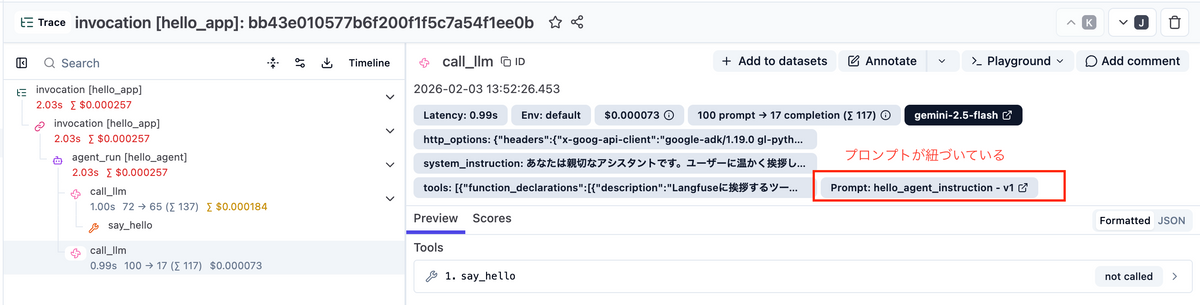
設定が成功すると、Langfuse ダッシュボードで以下が確認できます。
・Generation スパンにプロンプトリンクが表示される
・Prompt Metrics でコスト・レイテンシ分析が可能
・プロンプトバージョンごとの比較ができる
Langfuse ダッシュボード(設定後)
    └── call_llm (GENERATION)
    └── promptName: "my_agent_instruction"  ← 紐づいた!
    └── promptVersion: 1
━━━━━━━━━━━━━━━━━━━━━━━━━━━━━━━━━━━━━━━━